Request
Capture calls, emails and customer messages while the context is fresh.
 Cuotaro
Service operations software
Payment follow-up for service work
See which payments are still due after a job. Keep amounts, due dates, paid dates and follow-up notes linked to the customer and work.
Capture calls, emails and customer messages while the context is fresh.
Build priced lines, totals and customer-ready PDF quotes.
Schedule accepted work and keep notes, maps and files together.
Track due dates, collections, refunds and unpaid work.
Finishing a service job does not always mean the payment has arrived. A linked payment record keeps the expected amount, due date, paid date and notes with the customer and the relevant quote or job.
The due date records when the money is expected. The paid date records when it was received. Cuotaro counts a payment as received only when a paid date has been entered. Enter that date once the money has arrived, even if the customer has already promised a transfer.
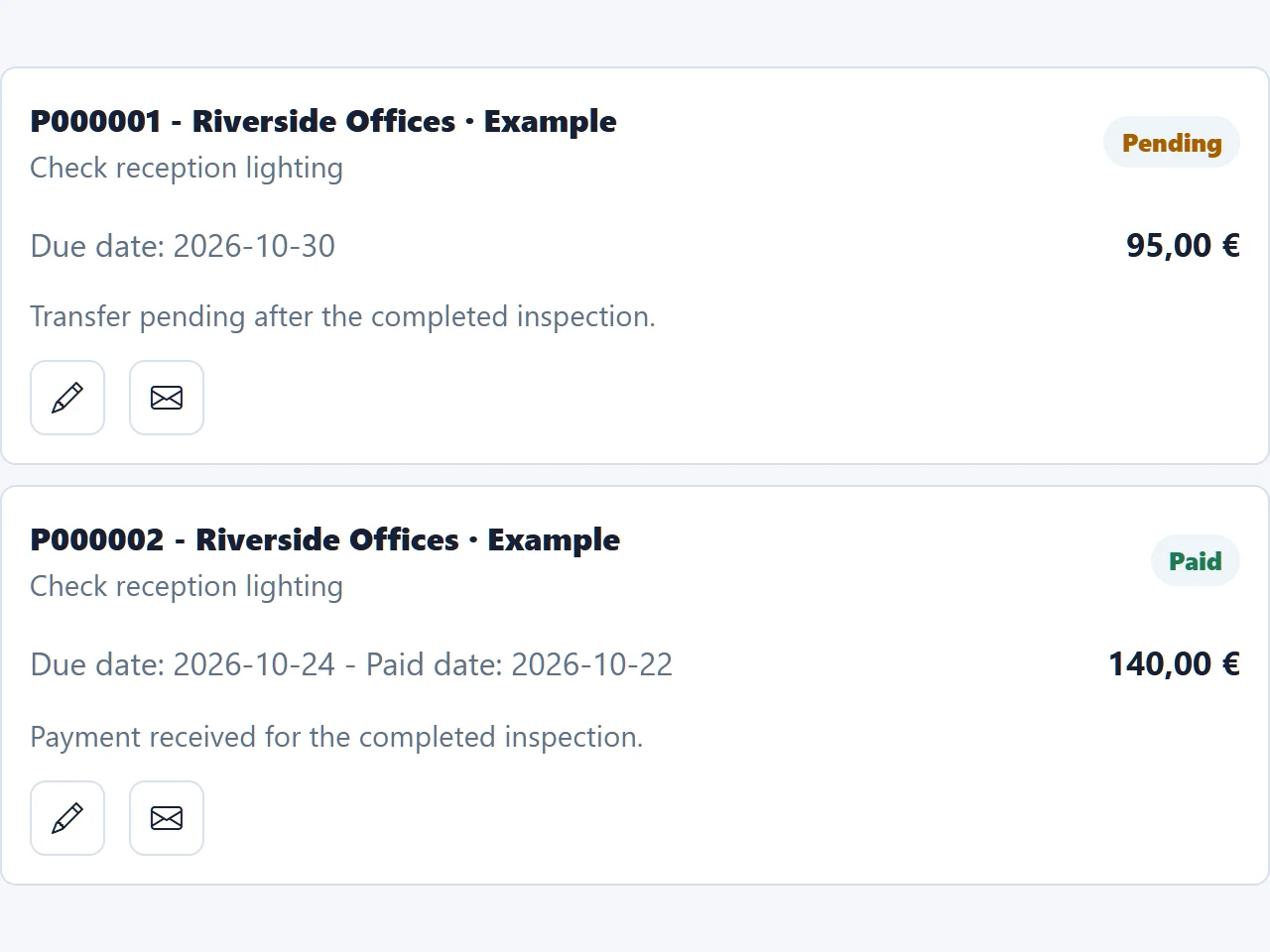
In the fictional workspace shown above, a reception lighting inspection for Riverside Offices has been completed. One record shows €95 due on October 30, with a note that the transfer is still pending. Check the payment on the agreed date and record any useful update.
The capture also shows a separate €140 record with a paid date of October 22. Each entry has its own amount and dates. Do not treat a completed job or a payment promise as evidence that an outstanding amount has been received.
When the €95 arrives, enter its actual paid date. If it has not arrived, note the outcome of your check and decide the next action with the responsible team member.
Use a linked reminder to check a transfer, call the customer or follow up after an agreed date. Assign it to the team member who will act and include the information they need.
The reminder's date is when the follow-up should happen; it does not change the payment's due date. Reminder emails go to the assigned team member. Your team contacts the customer separately and updates the payment record afterward.
If only part of an amount has arrived, keep the received portion distinct from what is still expected. Record the portions separately when you need to track each amount, and use notes to explain the split. Do not mark the full amount as received when only part has been paid.
An overdue amount can still be expected. The Unpaid flag has a different purpose: it removes amounts from expected collections, so it should not be used simply because a due date has passed. Negative amounts can represent refunds; add a note to explain the movement.
The English template helps you organize expected amounts, due dates, payment status and the next follow-up action. The tutorial uses a fictional case to distinguish a promise to pay, a partial payment and the end of the follow-up.
The CSV works independently in Excel or Google Sheets. It is not a Cuotaro import file, does not synchronize with the app and does not send automatic reminders.
Cuotaro helps a small service team find what remains to be checked after the work is done. The payment stays linked to the customer and the related quote or job, so the next conversation has the right context.
This is an internal record maintained by your team. It does not issue invoices, reconcile bank transactions or send automatic collection sequences. Keep invoicing, accounting and specialist finance processes in the tools you use for those tasks.
Questions
Keep the expected amount, due date, paid date and notes. Link it to the customer and, where relevant, the quote or job so you can identify what the payment relates to.
The due date is when the money is expected. The paid date is when it was received. Cuotaro treats a payment as received only when a paid date has been entered.
No. Note the promised date and plan the next check. Enter the paid date when the money has actually been received.
Keep the amount received distinct from the amount still expected. If you record them separately, enter a paid date only for the received portion and keep the remaining amount's due date. Use notes to explain the split.
No. The Unpaid flag removes an amount from expected collections. A late payment may still be expected, so a missed due date alone is not a reason to use that flag. Keep your notes and next follow-up action current.
The assigned team member receives the reminder email. That person checks the payment or contacts the customer. Cuotaro does not send an automatic sequence of collection emails to the customer.
Yes. A negative amount can represent a refund. Link the record to the relevant customer and work, and add notes explaining the movement.
No. It keeps operational payment information alongside service work. Your team maintains those records, while invoices, bookkeeping and bank reconciliation remain in your specialist finance tools.
Product information
Tell us about your service business and we will reply with the Cuotaro information that is most relevant to you.
Already working with Cuotaro?
Open the appNext step
Try TEAM 2 with your own service work for 21 days: 2 users, 8 GB storage and full functionality. No payment details required. If you prefer to ask first, use the form and we will reply by email.