Request
Capture calls, emails and customer messages while the context is fresh.
 Cuotaro
Service operations software
Team follow-up reminders
Plan customer callbacks, quote follow-ups, visits and payment checks. Give each reminder a due date and responsible team member, linked to the relevant customer or work.
Capture calls, emails and customer messages while the context is fresh.
Build priced lines, totals and customer-ready PDF quotes.
Schedule accepted work and keep notes, maps and files together.
Track due dates, collections, refunds and unpaid work.
A customer needs a callback, a quote is waiting for a response or a payment needs checking. Create a reminder for the person who will take that next step, and link it to the customer and the relevant request, quote, job or payment.
Reminder emails go to the assigned team member. That person makes the call, checks the information or contacts the customer separately. Cuotaro does not send automatic appointment reminders or follow-up email sequences to your customers.
Describe an action someone can carry out, such as confirming access before a visit or asking whether the customer has reviewed a quote. Add the notes they will need so they do not have to reconstruct the conversation.
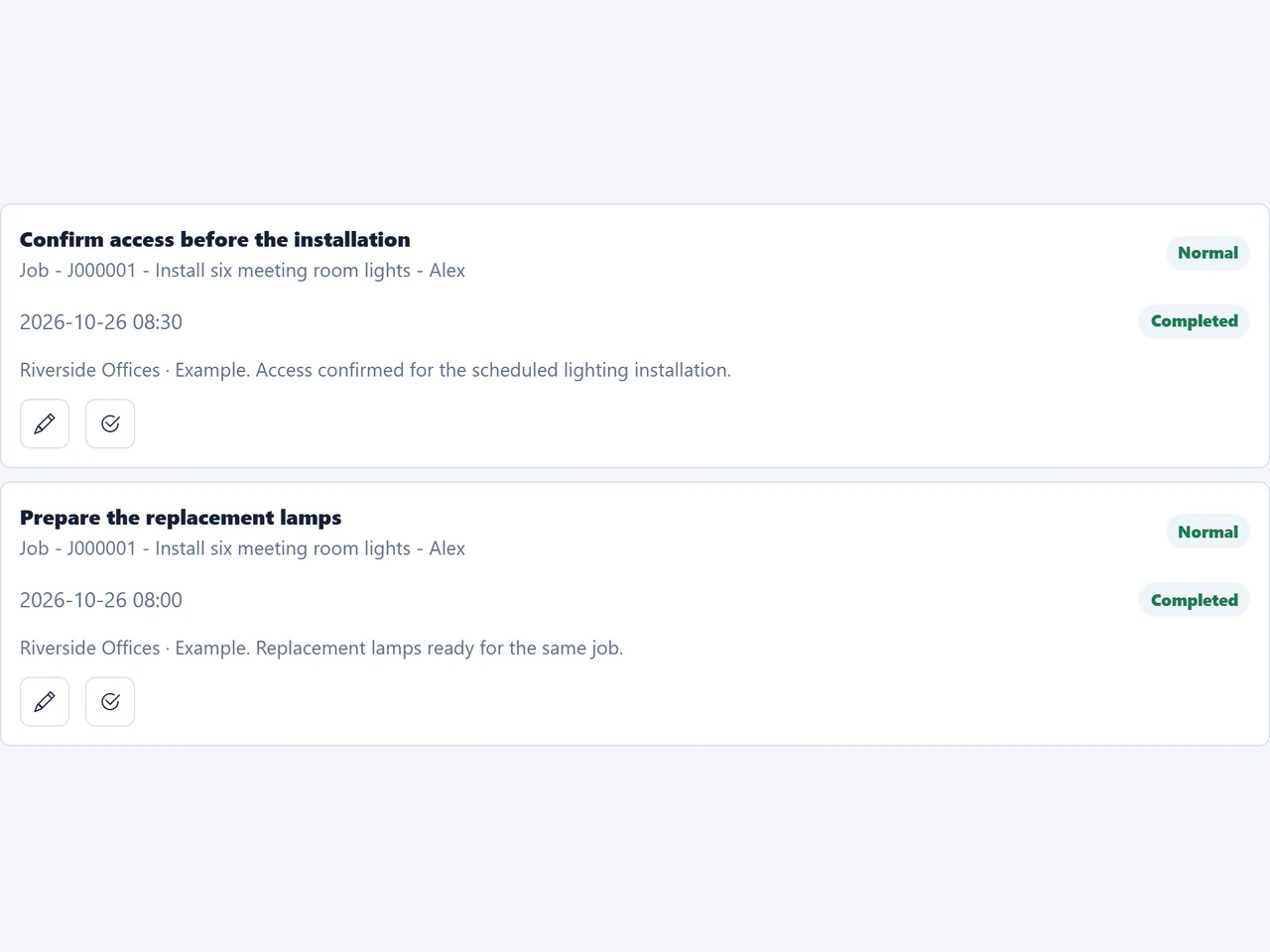
In the fictional workspace shown above, Riverside Offices has accepted work to replace six meeting room lights. Two reminders are linked to that job and assigned to Alex: confirm access with the customer and prepare the replacement lamps.
Each reminder has its own action and due time before the installation. Once access is confirmed, record the outcome and mark that reminder complete. Preparing the lamps is a separate action to complete when the materials are ready.
The capture shows both reminders after completion. Finishing a preparation task does not complete the installation or record a payment. Update the job status and payment details separately.
A reminder's due date is when someone should act. A job's scheduled date is when the visit will take place. A payment's due date is when the money is expected. These may be different dates, even when they relate to the same work.
For a sent quote, set a reminder to contact the customer on an agreed date. For an outstanding payment, set one to check a transfer or follow up after a conversation. If the next action changes, update the reminder's date and notes to reflect the new plan.
After making the call or completing the check, add the useful outcome to the relevant record. Complete the reminder when its action is finished. If more work is needed, make the next action clear and set an appropriate follow-up date.
Your team stays responsible for customer communication and for updating quotes, jobs and payments. A reminder provides the prompt and the context; it does not automatically approve a quote, confirm a visit or collect a payment.
The free English quote follow-up, job planning and pending-payment templates include space to organize the work and its next action. They can help you agree a routine before moving active records into Cuotaro.
These are standalone spreadsheets for Excel or Google Sheets. They do not send reminders, sync with Cuotaro or act as import files. The tutorials use fictional examples to show how to keep the next step clear.
Questions
The team member assigned to the reminder receives it. That person then takes the action, such as calling the customer or checking a payment. The reminder email is not sent to the customer.
Link it to the customer and, where relevant, a request, quote, job or payment. This keeps the task close to the information needed to carry it out.
Not necessarily. The reminder's due date is when the assigned person should act. For example, confirming access may be due before the scheduled installation. Keep the visit date in the job record.
No. Completing a reminder records that its action is finished. Update the job separately when the work has been carried out, and enter the paid date in the payment record when the money is received.
No. Cuotaro reminders support the assigned team member. Your team handles customer calls and messages separately; the app does not provide automatic customer appointment notifications or follow-up sequences.
Update the reminder's date and notes to match the new plan. Record the useful outcome of the conversation in the related request, quote, job or payment so another team member can continue the follow-up.
Yes. For example, remind the assigned person to ask about a sent quote or check whether a transfer has arrived. Keep the quote status and payment information up to date separately after the check.
No. The quote follow-up, job planning and pending-payment templates help you organize dates and next actions in a spreadsheet. They do not send notifications or synchronize with Cuotaro.
Product information
Tell us about your service business and we will reply with the Cuotaro information that is most relevant to you.
Already working with Cuotaro?
Open the appNext step
Try TEAM 2 with your own service work for 21 days: 2 users, 8 GB storage and full functionality. No payment details required. If you prefer to ask first, use the form and we will reply by email.