Request
Capture calls, emails and customer messages while the context is fresh.
 Cuotaro
Service operations software
An alternative to spreadsheet job trackers
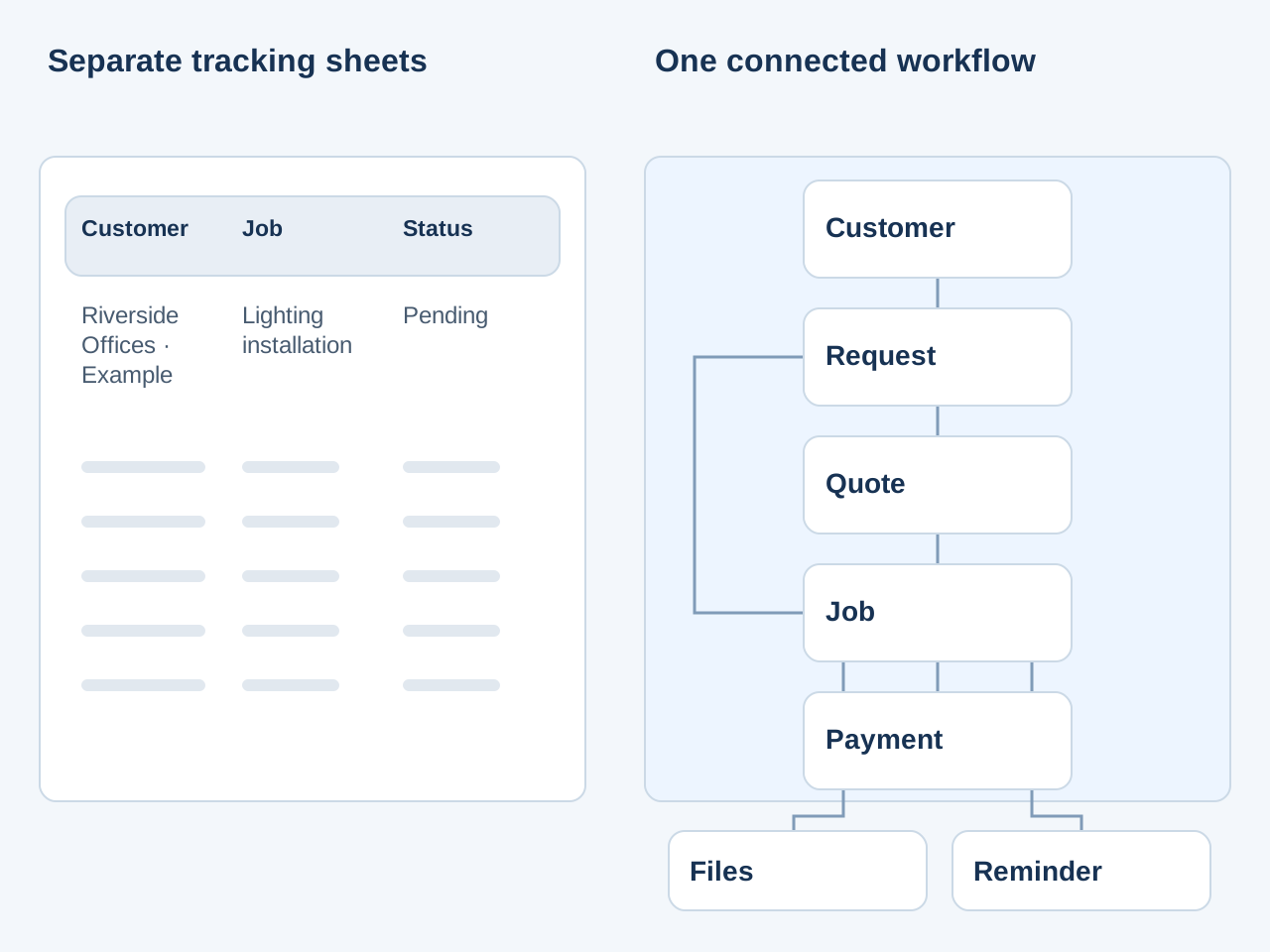
Replace scattered tracking sheets with linked records for requests, quotes, jobs and payments. Keep customer details, files and the next action in context.
A job can also start directly from a request.
Capture calls, emails and customer messages while the context is fresh.
Build priced lines, totals and customer-ready PDF quotes.
Schedule accepted work and keep notes, maps and files together.
Track due dates, collections, refunds and unpaid work.
An Excel or Google Sheets job tracker is a sensible starting point. You can list the customer, work requested, quote amount, visit date and payment status in one place. The effort grows when several people also need to update emails, PDFs, calendars and folders.
Cuotaro connects customer requests, quotes, jobs, files, reminders and payment follow-up. Each stage has its own record, linked to the customer and the relevant work, so your team can find the details without rebuilding the story from several tabs.
The workflow begins with structured service request tracking before you confirm a booking.
Spreadsheets can represent a workflow. The question is how much time your team spends maintaining it, finding the latest information and checking that the next step has been handled.
You do not need to reproduce every column in a new system. Separate the customer details, the proposed work, the agreed job and the payment. Use the following fictional example to decide where each piece of information belongs.
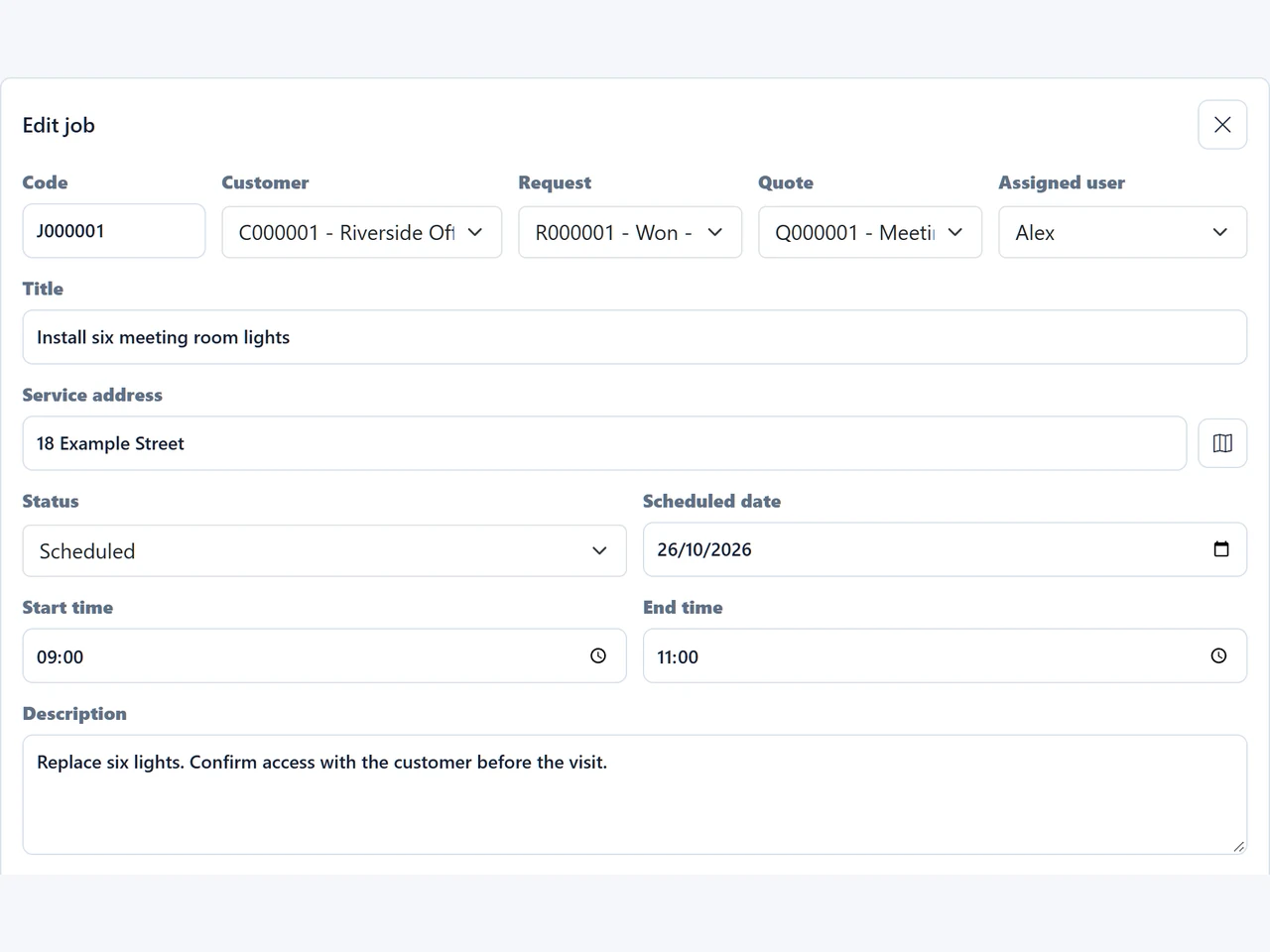
The fictional Riverside Offices request starts with six replacement lights. Prepare and send the quote, record the customer's acceptance, then create the installation job. The real app capture below shows the job linked to its customer, request and quote, with the assigned user, service address, date and times.
Attach the relevant photos to the appropriate record, use reminders to confirm access or prepare materials, and add a linked payment record when needed. You can follow the work through its stages without copying the same details into separate request, quote, schedule and payment sheets.
The quote-to-job tracking workflow explains the handover from an accepted proposal to scheduled work.
Start with a few active records rather than trying to recreate years of history. Enter the customer details, open requests, quotes awaiting a response, scheduled jobs and outstanding payments that the team still needs to act on.
This is a manual setup process. The free CSV templates are standalone spreadsheets, not Cuotaro import files, and this workflow does not include automatic Excel or CSV migration. Retain your historical workbooks as a reference and check any record-retention requirements that apply to your business.
See how Cuotaro works before deciding where to start.
If a spreadsheet still meets your needs, use the free English templates to make the handovers clearer. There is one for each stage: service requests, quote follow-up, job planning and pending payments. The tutorials walk through fictional examples and explain when a connected app can help.
A CRM focused on contacts may be enough if your main task is managing sales conversations. Cuotaro suits teams that also need to prepare quotes, schedule service work, keep job files together and follow up payment.
Here, a job means work your business carries out for a customer: an installation, repair, maintenance visit or similar service. Cuotaro helps a small team keep that work connected from the first request to completion and payment follow-up.
It is not an applicant tracking, employee monitoring or payroll system.
Cuotaro generates quote PDFs and keeps operational payment records, but it does not replace tax-compliant invoicing, accounting, full job costing, inventory management or advanced dispatching. Keep the specialist systems your business needs alongside it.
To evaluate the workflow, try one current service request from start to finish. The 21-day trial offers full functionality for 2 users with 8 GB of storage. No payment details are required.
Questions
Yes, when the tracker is used for customer service requests, quotes, scheduled jobs, files, reminders and payment follow-up. Cuotaro connects those records rather than reproducing every worksheet formula or providing an accounting system.
This workflow does not include automatic spreadsheet import. Start by entering a manageable set of active customers and work, and keep historical sheets as a reference. The free CSV templates are standalone spreadsheets, not Cuotaro import files.
Start with work that still needs action: open requests, sent quotes awaiting a response, scheduled jobs and outstanding payments. Add the customer details and supporting files needed to handle that work.
A job status describes progress on the service, such as scheduled, in progress or completed. A linked payment record tracks the expected amount, due date and paid date. A completed job can still have an outstanding payment.
Yes. Keep historical records or specialist calculations in spreadsheets if they are useful. Agree where the team will maintain current requests, quotes, jobs and payment follow-up so everyone knows where to find the latest information.
Cuotaro tracks work delivered to customers, such as installations, repairs and maintenance visits. It is not recruitment, employee monitoring or payroll software.
No. It provides quote pricing, PDF generation and operational payment follow-up. Keep tax-compliant invoicing, bookkeeping and full job costing in the specialist tools you use for those tasks.
Try TEAM 2 free for 21 days with 2 users, 8 GB storage and full functionality. No payment details required.
Product information
Tell us about your service business and we will reply with the Cuotaro information that is most relevant to you.
Already working with Cuotaro?
Open the appNext step
Try TEAM 2 with your own service work for 21 days: 2 users, 8 GB storage and full functionality. No payment details required. If you prefer to ask first, use the form and we will reply by email.